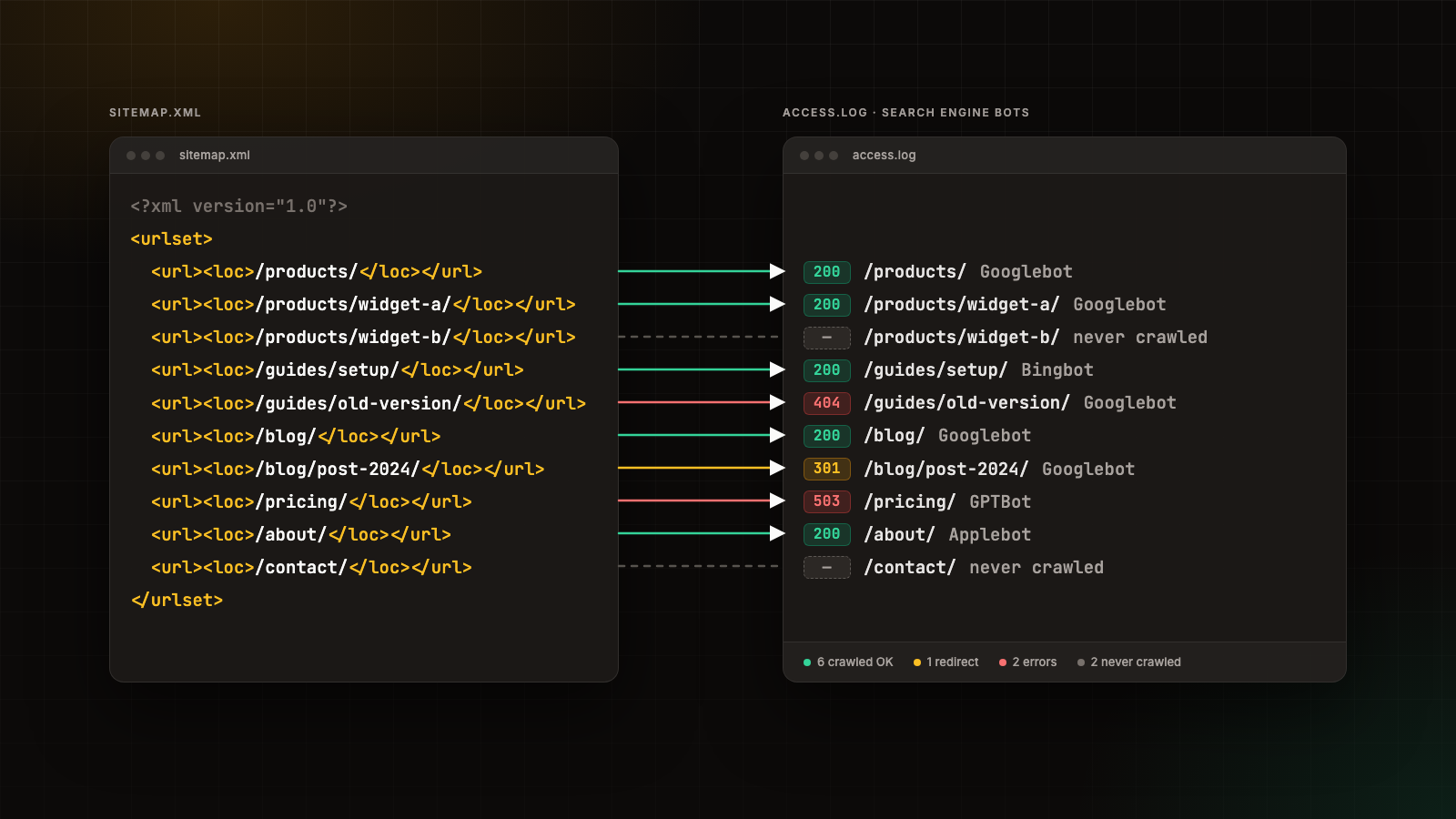
Introduction: The Gap Between What You Submit and What Actually Gets Crawled
XML sitemaps are one of the most fundamental tools in technical SEO. They serve as a direct line of communication between your website and search engine crawlers, telling Googlebot, Bingbot, and other engines which URLs exist, when they were last modified, and how frequently they tend to change. The protocol is well documented at sitemaps.org and in Google's own sitemap documentation.
But here is the problem: a sitemap is only a request, not a guarantee. You can submit a perfectly structured sitemap containing 50,000 URLs, and search engines may only crawl a fraction of them. Some URLs may return errors. Some may be crawled infrequently. Some may never be crawled at all. Without server log analysis, you are flying blind, hoping that crawlers are doing what your sitemap asks them to do.
This is where server log monitoring and analysis comes in. By examining the raw access logs from your web server, you can see exactly how search engine bots are interacting with your site, which URLs they are crawling, what response codes they receive, and how this aligns with the URLs listed in your XML sitemaps. Agencies such as Salience emphasise this as a critical component of any serious technical SEO strategy, because it closes the feedback loop between what you tell search engines to crawl and what they actually crawl.
What Server Log Analysis Reveals About Your XML Sitemaps
1. Crawl Coverage: Are Your Sitemap URLs Actually Being Crawled?
The most basic question server log analysis answers is: of the URLs in your sitemap, how many are actually being visited by search engine bots?
This is not a trivial question. Google's crawl budget documentation explains that Googlebot does not crawl every URL it discovers. Crawl budget is determined by two factors:
- Crawl rate limit: How fast Googlebot can crawl without overloading your server.
- Crawl demand: How much Google wants to crawl a given URL based on popularity and staleness.
If your sitemap contains URLs that are never or rarely crawled, those pages are unlikely to be indexed. Server log analysis lets you cross-reference your sitemap URL list against actual bot hits to identify:
- Orphan URLs: URLs in your sitemap that receive zero bot visits over a given period.
- Under-crawled URLs: URLs that are crawled so infrequently that updates are not being picked up in a timely way.
- Wasted crawl budget: URLs that are crawled repeatedly but offer little SEO value, diverting bot attention away from important pages.
2. Response Codes: What Happens When Crawlers Hit Your Sitemap URLs
Your sitemap may list a URL as valid, but when Googlebot actually requests it, the server may return a 404, a 500, or a 301 redirect. Server log analysis gives you the full picture of HTTP response codes per URL per bot.
Common issues uncovered through log analysis include:
| Response Code | Meaning | Impact on Sitemap |
|---|---|---|
| 200 OK | Page loads successfully | Ideal outcome, URL is accessible |
| 301/302 Redirect | URL redirects elsewhere | Sitemap should list the destination URL, not the redirecting one |
| 404 Not Found | Page does not exist | URL should be removed from the sitemap |
| 410 Gone | Page permanently removed | URL should be removed from the sitemap |
| 500/502/503 | Server error | Indicates hosting or application problems blocking crawl |
| 429 Too Many Requests | Rate limiting active | May be throttling legitimate bot crawls |
Google's Search Console sitemap report provides some of this information, but it is limited in granularity and latency. Server logs give you the raw, real-time data.
3. Crawl Frequency and Priority Alignment
XML sitemaps allow you to specify <priority> values (from 0.0 to 1.0) and <changefreq> tags. However, Google has stated that they largely ignore the <priority> tag. What actually matters is crawl demand, which is driven by signals Google observes independently.
Server log analysis lets you verify whether your most important pages are being crawled with the frequency you expect. If your homepage is crawled daily but your key product pages are only crawled once a month, you may need to:
- Strengthen internal linking to those pages.
- Re-evaluate your sitemap structure (split into multiple sitemaps by priority).
- Remove low-value URLs from the sitemap to free up crawl budget.
4. Bot Identification and Non-Google Crawlers
Server logs capture all bot traffic, not just Googlebot. This includes:
- Bingbot (Microsoft's Bing)
- Yandexbot (Yandex)
- Applebot (Apple, feeds Siri and Spotlight)
- DuckDuckBot (DuckDuckGo)
- Various AI crawlers (GPTBot, ClaudeBot, PerplexityBot, and others)
Understanding which bots are crawling your sitemap URLs, and at what rate, can inform your broader SEO and content distribution strategy. For instance, if Bingbot is crawling aggressively but your site gets significant traffic from Bing, you may want to ensure your sitemap is also submitted to Bing Webmaster Tools.